
Workspace policies
Set an organization baseline, add stricter member overrides, and verify what the installed CLI can enforce.
On this page
Policies configure workspace behavior for connected devices. Owners, administrators, and security managers can manage policies. Start in observe mode, validate the intended matches on a test device, and check the actual assistant adapter before relying on denial.
Choose a mode
| Mode | Current CLI behavior |
|---|---|
observe | Does not enforce workspace restrictions; capture and heuristic findings continue |
advisory | Baseline blocked tools, agents, and command patterns produce an approval decision |
enforce | Baseline blocked tools, agents, and command patterns produce a deny decision |
The current CLI emits agent-specific hook responses. Claude Code and Codex have an interactive approval response; adapters without an interactive approval channel deny approval-required actions instead. Actual enforcement depends on the installed CLI, agent version, and hook event. Verify the response in your target assistant before relying on it. Independent CLI safeguards, such as self-protection, can still act in Observe mode.
A missing or expired cached policy does not enforce these workspace rules. The current CLI can recover an unreadable policy from its last known good copy and denies when a present policy is invalid with no usable fallback. These controls are not an operating-system sandbox.
Set the organization baseline
Open Dashboard → Policies and edit the organization policy. Use Policy presets to add common restrictions, or select a mode, blocked tools, disabled agents, and blocked command patterns yourself. Save the change and note the resulting policy version.
The preset guide lists every preset, its exact tools or command patterns, and its limits. Adding a preset fills the current draft without changing its mode, removing existing rules, or publishing it. You can combine presets; an entry already present is not added again.
The current CLI also evaluates Advanced rules, including command, argument, path, and tool conditions. More specific matching rules take precedence, with the stricter action breaking ties. An existing specific allow rule can therefore override a broad blocked pattern. Explicit approval rules remain approval gates in non-Observe modes, and a block pinned to a full command line remains a deny in Advisory mode. Review existing advanced rules when adopting presets.
Add a stricter member override
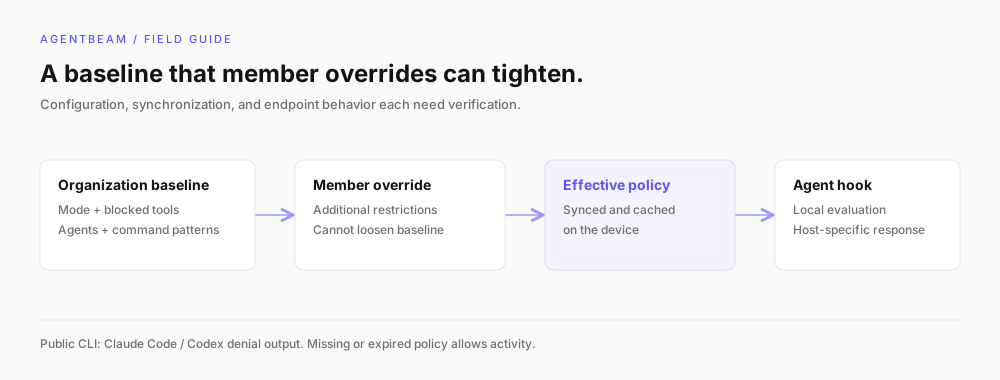
Select a member in the overrides section. Overrides can add restrictions or choose a stricter mode; they cannot loosen the organization baseline. Clearing an override returns the member to the baseline rather than disabling the organization's policy.
Assign an enforcement preset to a person
On Dashboard → Policies → Presets & assignments, use Individual assignments to choose a preset for one person. Allow all records activity without approval gates for that person's assigned CLI/browser enforcement profile. It replaces the enforcement rules inherited from their role or workspace profile; it does not turn off workspace tracking or content settings. An individual assignment takes priority over that person's role default. Choose Inherit to return to the role default, or to workspace rules if no role preset is assigned.
The Allow all preset is a per-person assignment choice, distinct from changing the organization policy's mode. Changing the organization mode changes the workspace baseline; assigning Allow all to one person leaves that baseline in place for everyone else. Personal restrictions can still tighten access. Publish assignments to apply the change.
Synchronize and test
beam whoami
beam sync
The collector normally polls every 60 seconds for enrolled devices. The hook evaluates cached policy locally, so an already-cached policy can be read while the collector is unavailable. An expired bundle allows actions instead of trapping an offline user.
Test a harmless matching action in the intended assistant, then verify its response and audit/activity evidence. A dashboard policy version is configuration evidence; it is not proof that every endpoint has synchronized or denied a call.
Separate policy from detection
Custom scan rules add findings and do not automatically create blocking rules. A reviewed finding does not approve future execution. Native MDM profiles configure device settings through a different management channel; do not use agent policy as a substitute for OS enrollment or isolation.
Set this up with your coding agent
Install the agentbeam-setup skill for Claude Code, Codex, Cursor, Gemini CLI, OpenCode and Copilot, then ask your agent to set up AgentBeam on this machine. Beam scans the skill before it installs.
npx -y @agent-beam/beam add skill agentbeam-setup -g --all-agents