
Device management
One place to understand your Apple and Windows fleet, deliver configuration, and request device actions.
On this page
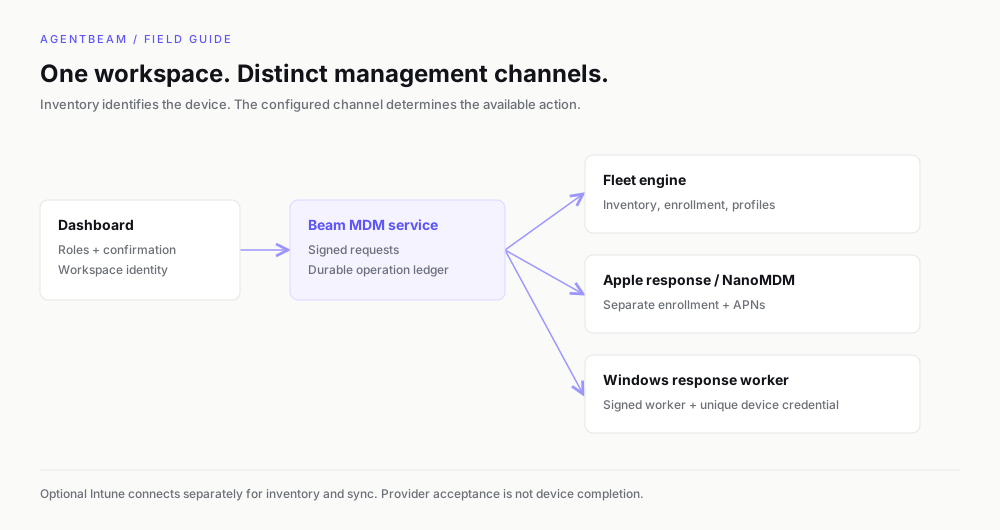
Beam MDM brings device inventory, enrollment downloads, configuration profiles, and guarded remote actions into your workspace. Open Device management in the dashboard to see the connections and controls available to your team.
Choose your management path
| Connection | Use it for | Prerequisites |
|---|---|---|
| Fleet through Beam | Apple and Windows inventory, enrollment, installers, profiles, and available provider actions | An isolated Fleet instance for your workspace, platform enrollment identities, and published installers |
| Beam device response | Lock and wipe through a separately provisioned response channel | NanoMDM for Apple or a signed Windows worker, plus a verified Fleet inventory binding |
| Microsoft Intune | Read existing inventory, compliance, and encryption; optionally request sync | An existing licensed Intune tenant and server-side Graph credentials |
If native Fleet management and Intune are both configured, the native connection takes precedence in the dashboard. Beam does not combine them into a deduplicated inventory.
Start with a small fleet
- Request access and check readiness with an owner or administrator account.
- Configure the platform identities and enroll a test device.
- Confirm its name, enrollment, encryption, and last-seen time in inventory.
- Deliver a reviewed configuration profile in a test workspace.
- Set up and validate device response separately if you need it.
What to expect from a command
A request can be recorded, accepted by the provider, and still waiting for an offline device. Accepted does not mean completed. Operation history and device acknowledgements provide different pieces of evidence. Investigate an unknown result before submitting another command.
Current scope
The current UI does not provide application distribution, Beam group targeting, OS-update policy editors, a recovery-key escrow screen, or automatic certificate-renewal alerts. Intune is a visibility connection with optional sync; its enrollment and policy management stay in Intune. Fleet capabilities and licensing remain separate from your Beam subscription.
Set this up with your coding agent
Install the agentbeam-setup skill for Claude Code, Codex, Cursor, Gemini CLI, OpenCode and Copilot, then ask your agent to set up AgentBeam on this machine. Beam scans the skill before it installs.
npx -y @agent-beam/beam add skill agentbeam-setup -g --all-agents