
Lock, wipe & response channels
Choose the correct response path and understand exactly what each high-impact action can do.
On this page
Beam exposes remote actions only when the device, provider, role, and deployment configuration support them. There are two paths: provider actions through Fleet and Beam response through a separately bound Apple or Windows channel. A bound device uses Beam response rather than Fleet's premium lock/wipe endpoints.
Compare the channels
| Channel | Lock behavior | Wipe behavior |
|---|---|---|
| Beam response: Mac | Apple DeviceLock with an operator-supplied six-digit recovery PIN | Restricted to verified Apple silicon/T2 devices ready for Erase All Content and Settings |
| Beam response: iPhone/iPad | Apple DeviceLock; does not enable Lost Mode or location tracking | Apple EraseDevice with appropriate device-enrollment rights |
| Beam response: Windows | Disconnects active console/RDP sessions; users can sign in again | Requests the OS's standard Windows reset |
| Fleet provider actions | Depends on platform and Fleet capabilities; iOS/iPadOS lock uses Lost Mode | Provider-managed erase with its own prerequisites and licensing |
Fleet Premium is separately required for the Fleet lock/wipe path. Fleet Windows lock/unlock additionally needs scripts enabled; the provided installer builders do not turn scripts on automatically. Beam response has separate provisioning requirements and does not remove the need for Fleet inventory.
Review and submit an action
- Open the device and verify its exact identity, platform, and response channel.
- Confirm that you have current owner or administrator access.
- Read the action description. High-impact operations require deployment enablement, the exact device name, and password reauthentication.
- For Beam response, enter an operational reason. Wipe additionally requires
ERASE ALL DATAand per-device wipe enablement. - For a Mac lock, store a fresh six-digit PIN in your organization's vault before entering it. Beam does not escrow the PIN or provide remote unlock for this channel.
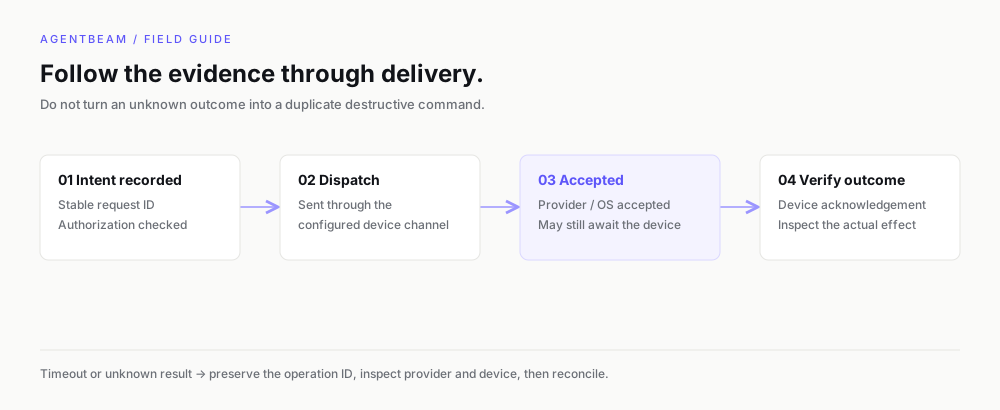
- Submit once, preserve the operation ID, and verify the provider/device outcome.
Handle offline and uncertain devices
Apple commands accepted by NanoMDM may execute when the device comes online. They do not expire in Beam and cannot be cancelled here. Only uncollected Windows response commands can be cancelled; they expire after ten minutes if uncollected.
Unknown or unconfirmed results block further Beam response actions on that device. Inspect worker receipts, OS state, or the NanoMDM queue with your operator. Do not clear evidence or submit a new wipe to resolve uncertainty.
Validate the channel first
Real device behavior depends on enrollment, OS support, and provider configuration. Test lock, recovery, offline delivery, and wipe on disposable hardware before fleet activation. An OS acknowledgement does not certify secure sanitization of every disk.
Set this up with your coding agent
Install the agentbeam-setup skill for Claude Code, Codex, Cursor, Gemini CLI, OpenCode and Copilot, then ask your agent to set up AgentBeam on this machine. Beam scans the skill before it installs.
npx -y @agent-beam/beam add skill agentbeam-setup -g --all-agents