
Agent CLI overview
Understand agent activity locally, scan the files your assistants use, and connect shared workspace controls when needed.
On this page
Beam is a local collector and command-line interface for AI coding assistants. It normalizes agent events, redacts recognized secrets, and flags patterns for review. You can run offline file scans without starting the collector or creating an account.
Pick your starting point
| Task | Start here |
|---|---|
| See your first captured action | CLI quickstart |
| Connect the agents on your machine | Agent hooks |
| Review a skill or MCP configuration | Offline scanning |
| Check an npm or PyPI package | Package scanning |
| Optionally judge an action with Jev | Jev action judging |
| Share activity with a workspace | Connect a workspace |
| Use scanning inside an MCP host | Beam MCP |
| Review prompts in a browser | Beam Sentinel extension |
How the pieces fit
An agent invokes beam hook with an event. Beam adapts the payload, evaluates any cached workspace policy, and sends the event to the local collector. The collector normalizes, redacts, detects patterns, and stores bounded NDJSON records. Studio reads the local collector's authenticated API.
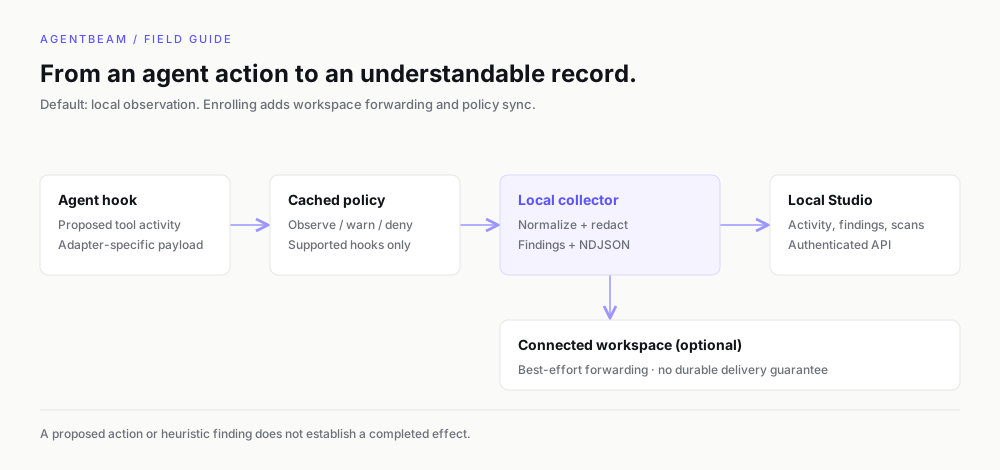
When you connect a workspace, the collector can forward normalized events and saved scans to that workspace. Forwarding is best-effort; it is not a durable delivery queue. Keep that distinction in mind when comparing local and dashboard history.
Observation and policy are separate
Unconnected Beam runs in observe mode. A heuristic finding is not an approval, block, or proof that a command executed. Offline scanning remains read-only.
Connected workspaces can configure observe, advisory, or enforce policy. Current CLI denial output is wired for Claude Code and Codex PreToolUse hooks. Other adapters emit a message when a policy would deny, without a verified blocking response. Missing or expired cached policy allows the action. See policy behavior before relying on it.
Optional remote action judging
Jev action judging adds Noul and Score checks using your TypeSafe key. It is disabled by default, independent of workspace enrollment, and does not turn on when a key is merely present. Observation keeps the existing hook decision even when a request fails. Explicitly choosing Jev enforcement lets unfavorable or failed evaluations stop eligible actions.
Enabling this integration sends selected, redacted action data to TypeSafe. It preserves local policy decisions and leaves offline scanning unchanged. Review its data boundary before opting in.
Know the product boundaries
The public CLI is userspace software, not kernel-level capture. The optional enterprise package has separate platform capabilities. The MCP server wraps local read-only tools, while the browser extension operates on supported AI websites. MDM enrollment, CLI workspace pairing, and extension installation are independent setup steps.
Set this up with your coding agent
Install the agentbeam-setup skill for Claude Code, Codex, Cursor, Gemini CLI, OpenCode and Copilot, then ask your agent to set up AgentBeam on this machine. Beam scans the skill before it installs.
npx -y @agent-beam/beam add skill agentbeam-setup -g --all-agents